 775-336-4000




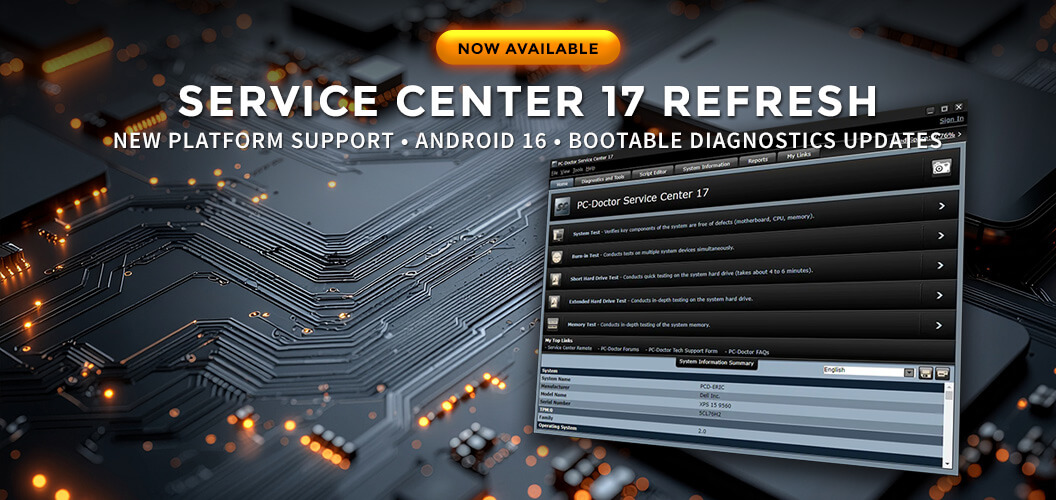
At PC-Doctor, maintaining compatibility with evolving hardware platforms, operating systems, firmware technologies, and security requirements is an ongoing priority.
We're pleased to announce the latest Service Center 17 Refresh release, delivering expanded platform support, diagnostic enhancements, compatibility improvements, and an important update for organizations using Bootable Diagnostics on Secure Boot-enabled systems.
What's New in the Latest Service Center 17 Refresh
This release includes several updates designed to keep Service Center compatible with modern devices and emerging platforms.
Android 16 Support
Service Center now officially supports Android 16, helping technicians continue testing and diagnosing the latest Android devices as they enter service environments.
Refreshed Bootable Diagnostics Environment
The Bootable Diagnostics environment has been updated to improve compatibility with newer hardware platforms, firmware implementations, and Secure Boot requirements.
Expanded Intel Processor Support
This refresh adds support for:
- Intel Alder Lake-N processors
- Intel Xeon Ice Lake variants released after 2020
- Intel Panther Lake platforms
- Intel Wildcat Lake platforms
Diagnostic Enhancements and Fixes
In addition to platform updates, this release includes diagnostic improvements, maintenance updates, bug fixes, and compatibility enhancements designed to improve overall reliability and testing accuracy.
Important Secure Boot Compatibility Update
This refresh also includes updates that address a Secure Boot compatibility issue affecting older Service Center bootable environments.
What Changed?
PC-Doctor was recently notified by Microsoft that the Secure Boot implementation used by older versions of the PC-Doctor bootloader could be leveraged by third parties to load custom unsigned drivers during the boot process.
Under certain circumstances, a malicious actor could potentially reuse the bootloader distributed with Service Center to boot a Secure Boot-enabled system and load an unsigned driver that would otherwise be blocked by Secure Boot protections.
Microsoft's Response
To mitigate this risk, Microsoft has added the affected PC-Doctor bootloader to the UEFI Forbidden Signature Database (DBX).
The DBX is a list of bootloaders and signatures that Secure Boot explicitly blocks from running during system startup.
Why This Matters
As systems update their UEFI Secure Boot key stores through Windows Update or other platform security mechanisms, affected versions of Service Center Bootable Diagnostics will no longer boot on systems where Secure Boot is enabled.
For organizations that rely on Bootable Diagnostics, this is primarily a compatibility issue. Older bootable environments may eventually fail to launch on systems that have received updated Secure Boot revocation lists.
Importantly, Secure Boot itself continues functioning normally. The change specifically prevents affected legacy PC-Doctor bootloaders from being trusted during the boot process.
Who Is Affected?
Organizations using Bootable Diagnostics from the following Service Center versions may be affected:
- Service Center 14
- Service Center 15
- Service Center 16
- Earlier Service Center 17 bootable environments
If your organization regularly uses Bootable Diagnostics on Secure Boot-enabled systems, updating should be considered a priority.
What Action Should You Take?
To maintain compatibility with Secure Boot-enabled systems, organizations should update to the latest Service Center 17 Refresh release.
Current Service Center 17 customers can install the latest refresh release at no additional cost. Get the Latest Refresh
Organizations running older versions of Service Center should purchase a Service Center 17 upgrade key or a new Service Center 17 kit to continue using Bootable Diagnostics on systems that receive UEFI DBX updates.
Technical Reference
The Secure Boot compatibility issue described above is related to a vulnerability class documented under CVE-2026-8863.
For technical details, refer to the National Vulnerability Database entry: https://www.cve.org/CVERecord?id=CVE-2026-8863
While the vulnerability itself is not unique to PC-Doctor software, Microsoft's mitigation includes revocation of affected bootloaders through the UEFI Forbidden Signature Database (DBX), making updates necessary for continued compatibility on Secure Boot-enabled systems.
Download the Latest Service Center 17 Refresh
The latest Service Center 17 Refresh release is available now.
Current Service Center 17 customers can download the refresh at no additional cost. Organizations running earlier versions can explore Service Center 17 upgrade keys or new Service Center 17 kits to access the latest platform support, diagnostic enhancements, and Bootable Diagnostics improvements.
Frequently Asked Questions
Which Service Center versions are affected by the Secure Boot compatibility issue?
The issue affects Bootable Diagnostics environments included with Service Center 14, Service Center 15, Service Center 16, and earlier Service Center 17 bootable environments that use the affected bootloader. Organizations using Bootable Diagnostics on Secure Boot-enabled systems should install the latest Service Center 17 Refresh release or upgrade to Service Center 17 if running an older version.
Why might Bootable Diagnostics stop booting on Secure Boot-enabled systems?
Microsoft has added the affected PC-Doctor bootloader to the UEFI Forbidden Signature Database (DBX). As systems receive updated Secure Boot revocation lists through Windows Update or firmware updates, affected bootable environments may no longer be permitted to run when Secure Boot is enabled.
Do current Service Center 17 customers need to purchase an upgrade?
No. The latest Service Center 17 Refresh release is available at no additional cost to current Service Center 17 customers. Simply download and install the latest refresh release to maintain compatibility and access the newest platform support updates.
What should I do if I'm running Service Center 14, 15, or 16?
Organizations running older versions of Service Center should purchase a Service Center 17 upgrade key or a new Service Center 17 kit to continue using Bootable Diagnostics on systems that receive UEFI DBX updates and to benefit from the latest platform compatibility enhancements.
Does this issue affect Windows-based Service Center diagnostics?
This compatibility issue specifically affects the Bootable Diagnostics environment. Organizations that use Windows-based Service Center diagnostics are not affected by the Secure Boot bootloader change described in this article.
What is the UEFI Forbidden Signature Database (DBX)?
The UEFI Forbidden Signature Database (DBX) is a list maintained by platform vendors and operating system providers that identifies bootloaders and signatures that Secure Boot should no longer trust. Systems that receive updated DBX entries will prevent affected bootloaders from running during the startup process.
How do I know if I need the latest Service Center 17 Refresh release?
If you use Bootable Diagnostics on Secure Boot-enabled systems, the latest Service Center 17 Refresh release is strongly recommended. The update includes Secure Boot compatibility improvements, Android 16 support, expanded Intel platform coverage, and additional diagnostic enhancements.

